Food & Beverage · PDF Template
Restaurant Menu PDF Template
Dishes grouped by course with prices, portion sizes and dietary tags. Free to build, and it exports as a printable PDF.
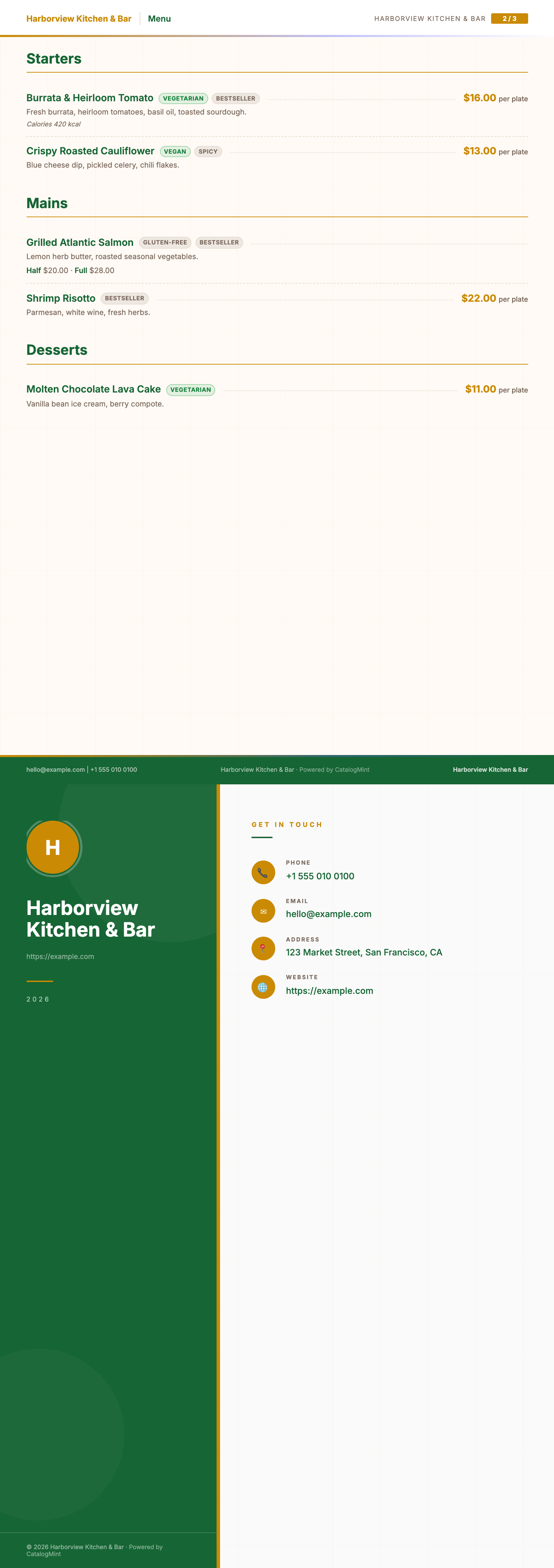
Real pages from this template, rendered by CatalogMint with sample data — your own dishes and photos will appear once uploaded.
Download the sample PDF3 pages · A4 · 493 KB · no sign-up needed
Who it's for
- Restaurants and casual dining
- Cafés and cloud kitchens
- Anyone who needs a printed menu for the table and a link for WhatsApp
Built for menus that change. Put the prices in once and you can reprint, or just update the link on the table.
Start with this template →Free to build your menu · PDF export included on the free plan, with a monthly cap.
What prints on the menu
Everything below is optional except the dish name and price. Fill in what you have and the rest stays off the page.
- Course sections
- Dishes group into sections from their category — Starters, Mains, Desserts, Drinks. Rename a category and the heading on the menu changes with it.
- Dish name and description
- The name in full, then one line underneath for what is in it. This is where most kitchens list the things people ask about.
- Price
- In your currency, set per dish. Change it once in your product library and the next export carries it through.
- Portion options
- Half and Full, Small and Large, Glass and Bottle — added as product variants, printed as separate prices on the same line.
- Dietary tags
- Veg, Vegan, Spicy, Gluten-free. Added through a specifications key called "badges" as a comma-separated list, then printed beside the dish.
How to make your menu
- 1
Add your dishes
One dish per product — name, price, and a line of description. A photo is optional on this template, because a menu reads better as text than as a photo grid.
- 2
Put them into courses
Set a category on each dish: Starters, Mains, Desserts. The menu prints a heading above each group in the order you set.
- 3
Add portions and tags
For Half and Full pricing, add a variant option called "Portion". For dietary labels, add a specification called "badges" with something like "Veg, Spicy". Both are optional — skip them and the dish still prints cleanly.
- 4
Export and print
Download the PDF for the printer, and use the same menu as a live link with a QR code for the table. Changing a price updates the link straight away.
Frequently asked questions
Can I see a sample menu PDF before I sign up?
Yes. The sample PDF at the top of this page is this exact template rendered with sample dishes — three pages, A4, nothing to fill in first. Download it, print it, and see how it comes out on paper before you decide.
Is this restaurant menu template free?
Yes. Building the menu, sharing it as a live link or QR code, and exporting it as a printable PDF are all on the free plan. The free plan caps how many PDF exports you can run each month; paid plans lift that cap. The pricing page has the current numbers.
Can I print the PDF?
That is what it is laid out for. It prints on A4 by default, and you can switch the catalog to A3 or US Letter — the sections re-flow so nothing gets cut off at the margin.
How do I show half and full portions?
Add a variant option called "Portion" to the dish, with values like Half and Full and a price for each. The menu prints both prices on the dish line instead of two separate entries.
How do I mark dishes as veg or spicy?
Add a specification to the dish with the key "badges" and a comma-separated value, for example "Veg, Spicy". Those print as tags next to the dish name. Nutritional information goes in the same specifications list.
Can I change prices without reprinting?
Change the price once and the live menu link updates immediately, which is the usual reason restaurants put a QR code on the table. A PDF is a snapshot, so you would re-export and reprint that.
Can I customise the colours and layout?
Your logo, brand colours and cover details apply automatically. The layout structure — sections, portions, dietary tags — stays consistent so it always prints cleanly.
What if I want a different template later?
You can switch templates for the same catalog anytime. Your dishes, prices and photos carry over.
Want to build the digital version with a QR code first? See the restaurant menu maker. Running a food business more widely? See food & beverage on CatalogMint. Need prices in a scannable list instead of a menu? Try the Price List template. See all templates.
Get started with the Restaurant Menu template
Add your dishes, group them by course, and export a printable PDF. Free to build, and PDF export is on the free plan too.
Start with this template →