Wholesale & B2B · PDF Template
Price List PDF Template
A price sheet a buyer can actually order from — thumbnail, SKU, description and price on every row, twenty products to a page, grouped by category.
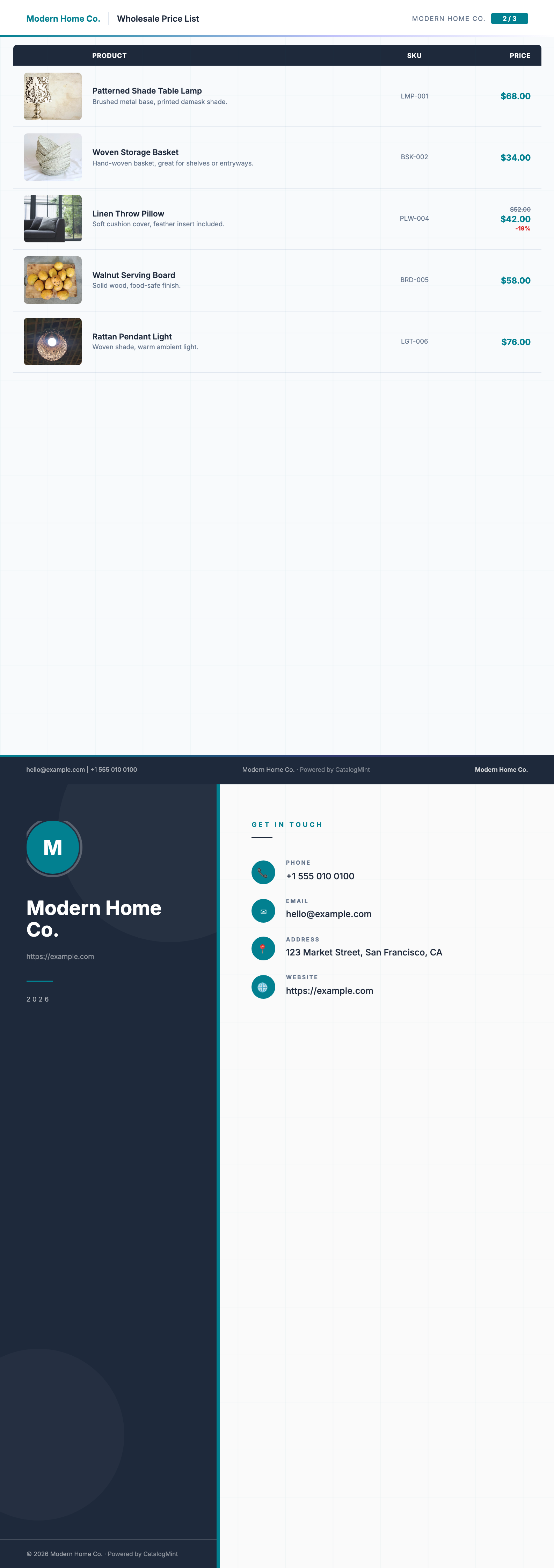
Real pages from this template, rendered by CatalogMint with sample data — your own product photos will appear once uploaded.
Download the sample PDF3 pages · A4 · 1.1 MB · no sign-up needed
Who it's for
- Wholesalers and distributors sending buyers a price sheet they can order from
- Anyone with 50 products or more, where a photo grid would run to eighty pages
- Sellers who need the same prices as a printout for a trade show and as a link on WhatsApp
If your buyers reply asking “what's the code for the third one?”, this is the template that fixes it.
Start with this template →Free to build · PDF export included on the free plan, with a monthly cap.
What each row shows
Five fields per product. Nothing else, because a price list that tries to show more stops being scannable.
- Thumbnail
- A 14×11mm photo of the product — big enough to recognise an item, small enough to keep twenty on a page.
- Product name
- Pulled from your product library, so it matches what you quote and invoice.
- Short description
- One line. Material, size, pack quantity — whatever a buyer asks you about most.
- SKU
- Your own code, printed next to the price so a buyer can order by it without phoning you.
- Price
- In your currency, right-aligned down the page so the column is easy to read down.
Products print in the category order you set, with a heading above each group. Add a category and the next export picks it up — you never move rows around by hand.
How to make your price list
- 1
Add your products
Upload a photo, type a name and a price. If you already have photos on your phone, you can drop a batch in at once and fill in the details afterwards.
- 2
Group them by category
Put your products into categories and the price list prints with a heading above each group. Buyers skim to the section they want instead of reading all forty pages.
- 3
Pick the Price List template
Your logo, colours and company details go on the cover automatically. You do not lay anything out by hand.
- 4
Export the PDF
Download it and send it however you like — WhatsApp, email, or printed for a trade show. The same catalog also has a live link you can update without resending the file.
Frequently asked questions
Can I see a sample price list PDF first?
Yes. The sample PDF at the top of this page is this exact template rendered with sample products — three pages, A4, no sign-up. Download it and check the row spacing and SKU column against what your buyers need.
Is the price list template free?
Yes. Building the price list, sharing it as a live link, and exporting it to PDF are all on the free plan. The free plan caps how many PDF exports you can run each month; paid plans lift that cap. The pricing page shows the current numbers.
How many products fit on one page?
Up to twenty, each on its own row. A 300-product price list comes out at roughly fifteen pages plus a cover, which is about as much as most buyers will read.
Does it print the SKU?
Yes, on every row, next to the price. That is the point of this template over a photo grid — a buyer can write down codes and quantities and send you an order.
What paper size does it print on?
A4 by default. You can switch the catalog to A3 or US Letter and the rows re-flow to fit, so nothing gets cut off at the margin.
Can I update prices without sending a new file?
Change the price in your product library and the live catalog link updates straight away. A PDF is a snapshot, so you would re-export and resend that — which is why most sellers send the link and keep the PDF for people who ask for one.
Can I use it for a line sheet?
That is what it is built for. A wholesale line sheet is a price list with SKUs and a thumbnail per row, which is exactly this layout.
Sending this to retail buyers? See wholesale & B2B line sheets, or read how to make a wholesale catalog. Need photos bigger than a thumbnail? The Modern Grid and Wholesale Catalog templates give each product more room. See all templates.
Get started with the Price List template
Add your products, group them by category, and export a print-ready PDF. Free to build, and PDF export is on the free plan too.
Start with this template →